Steps
- Open the editor at effectcraft.run/editor. Your first visit opens a demo project. Choose File › New › New Project for a clean start (pick Don’t Save if it asks about the demo).
- Import your video. File › Import › File…, or drop the file onto the page. It appears in the Project panel.
- Make a composition from it. Select the clip in the Project panel and choose File › New Comp from Selection…. The comp takes the clip’s size, frame rate and length, and the clip becomes its first layer.
- Apply an effect. Select the layer in the Timeline, then pick an effect from the Effect menu, or search for it in the Effects & Presets panel and drag it onto the layer.
- Adjust it in Effect Controls (F3). The viewer updates as you drag a value.
- Animate it. With the layer selected, press E to show its effects in the Timeline and twirl one open. Click the stopwatch next to a parameter to add a keyframe, move the playhead, and change the value to add another. F9 eases the selected keys.
- Preview with the Spacebar. Audio plays in sync once you have clicked into the page.
- Render. Composition › Add to Render Queue. The Output Module defaults to H.264 MP4; click it to choose ProRes, WebM, GIF or an image sequence instead. Click Render. The file downloads when it is done, and the editor stays usable while it renders.
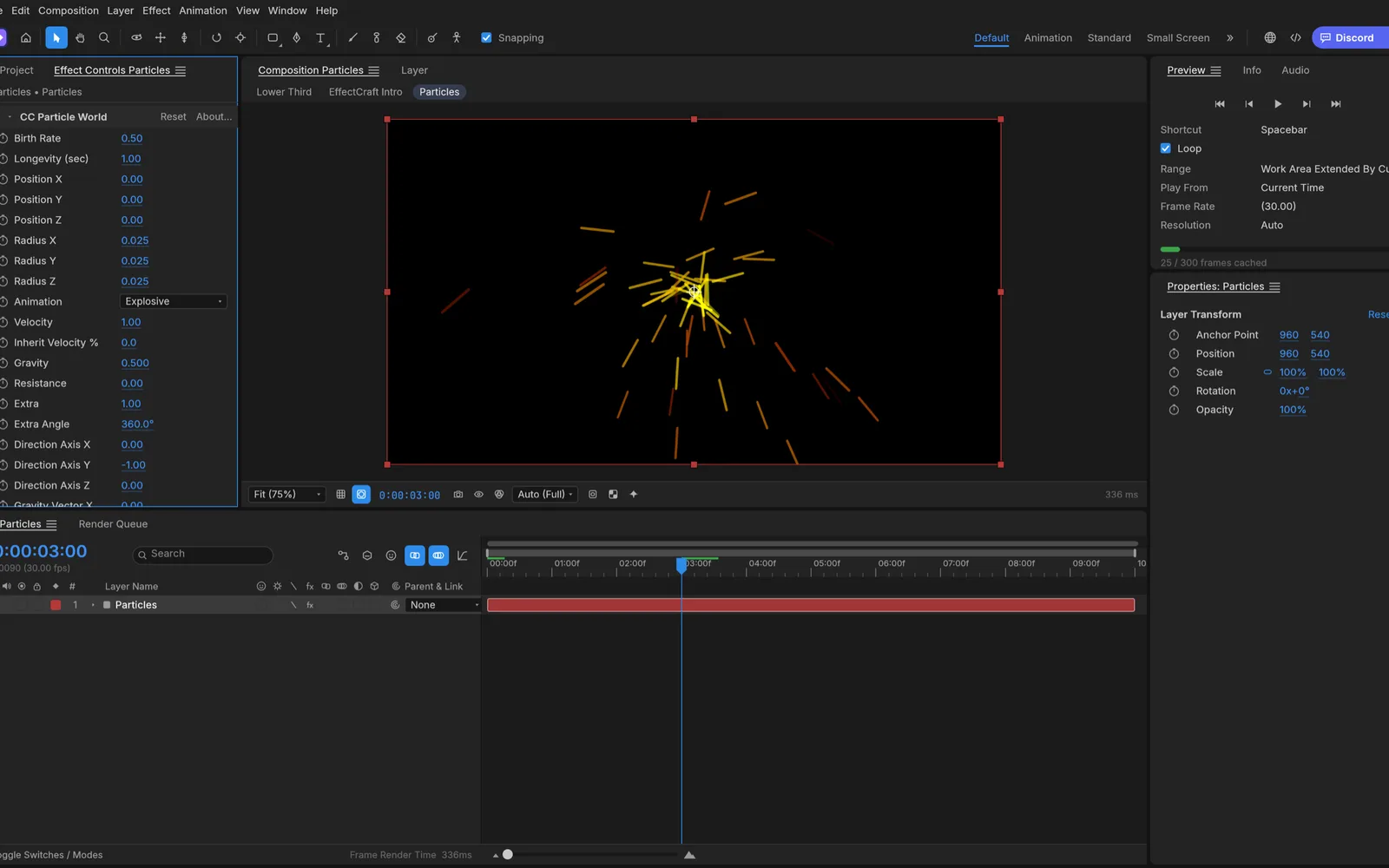
Which effect gives which look?
| Look | Effect | Tip |
|---|---|---|
| Soft bloom on highlights | Glow | Raise Glow Radius and lower Glow Threshold for a dreamy look |
| Blur a background or a face | Gaussian Blur | Mask the layer first to blur only part of the frame |
| Color grade | Lumetri Color, Curves | Put them on an adjustment layer to grade everything below |
| Heat haze or wobble | Turbulent Displace | Animate Evolution for constant movement |
| Sparks, snow or confetti | CC Particle World | Works on a solid layer above the footage |
| Rain over a shot | CC Rainfall | Set the drop count and wind |
| Trails and ghosting | Echo | A negative Echo Time trails behind the motion |
| Stop-motion feel | Posterize Time | Try 8–12 fps over 24 or 30 fps footage |
| Replace a green screen | Key Light | Pick the screen color with the eyedropper |
EffectCraft has 306 effects in all, including keying, distortion, generators, simulation, time and audio effects. Stack several on one layer; they run top to bottom in Effect Controls.
How do you apply an effect to only part of the clip?
- Part of the frame: draw a mask on the layer with the Pen or a shape tool, or duplicate the layer, mask the copy and put the effect on that.
- Part of the time: split the layer at the playhead with Edit › Split Layer, or trim an adjustment layer to the section and put the effect on it.
- Everything below: Layer › New › Adjustment Layer applies its effects to all layers underneath.
Tips
- Work at lower resolution while you experiment. Set the viewer’s resolution to Half or Quarter; renders still use full size.
- Chrome or Edge is fastest. They render effects on the GPU in background workers. Other browsers render effects on the CPU.
- Save often. File › Save keeps the project in your browser and downloads an .ecproj copy.
Want a generated background or a cut-out element to composite over your clip? The AI tools make one on your own API key and add it to the comp as a layer. New to the app? Read what EffectCraft covers of After Effects.
FAQ
Is my video uploaded?
No. EffectCraft runs in your browser. The clip is read on your device and kept in your browser’s storage for this site, effects render on your device, and the finished video downloads to your computer.
Which video formats can I import?
MP4 and MOV with H.264, HEVC or AV1, Apple ProRes, and WebM or Matroska with VP9 or AV1, plus WAV, AIFF, MP3, AAC, FLAC, Ogg and Opus audio. MXF and AVI are not supported yet.
Is there a watermark or a length limit?
No watermark and no fixed limit. The practical limit is memory: the browser build can use at most 4 GiB, so very long or 4K clips are better in the desktop app.
Can I save the effect to reuse it?
Yes. With the effect selected, Animation › Save Animation Preset… stores it as an EffectCraft preset. After Effects .ffx presets can’t be opened.