EffectCraft is a clean-room project written from scratch in Rust by the ArtCraft team. It follows After Effects’ public documentation and behavior, never Adobe’s code or files. On effectcraft.run/editor you get the same app as the desktop download, compiled to WebAssembly: free, with no account and no upload.
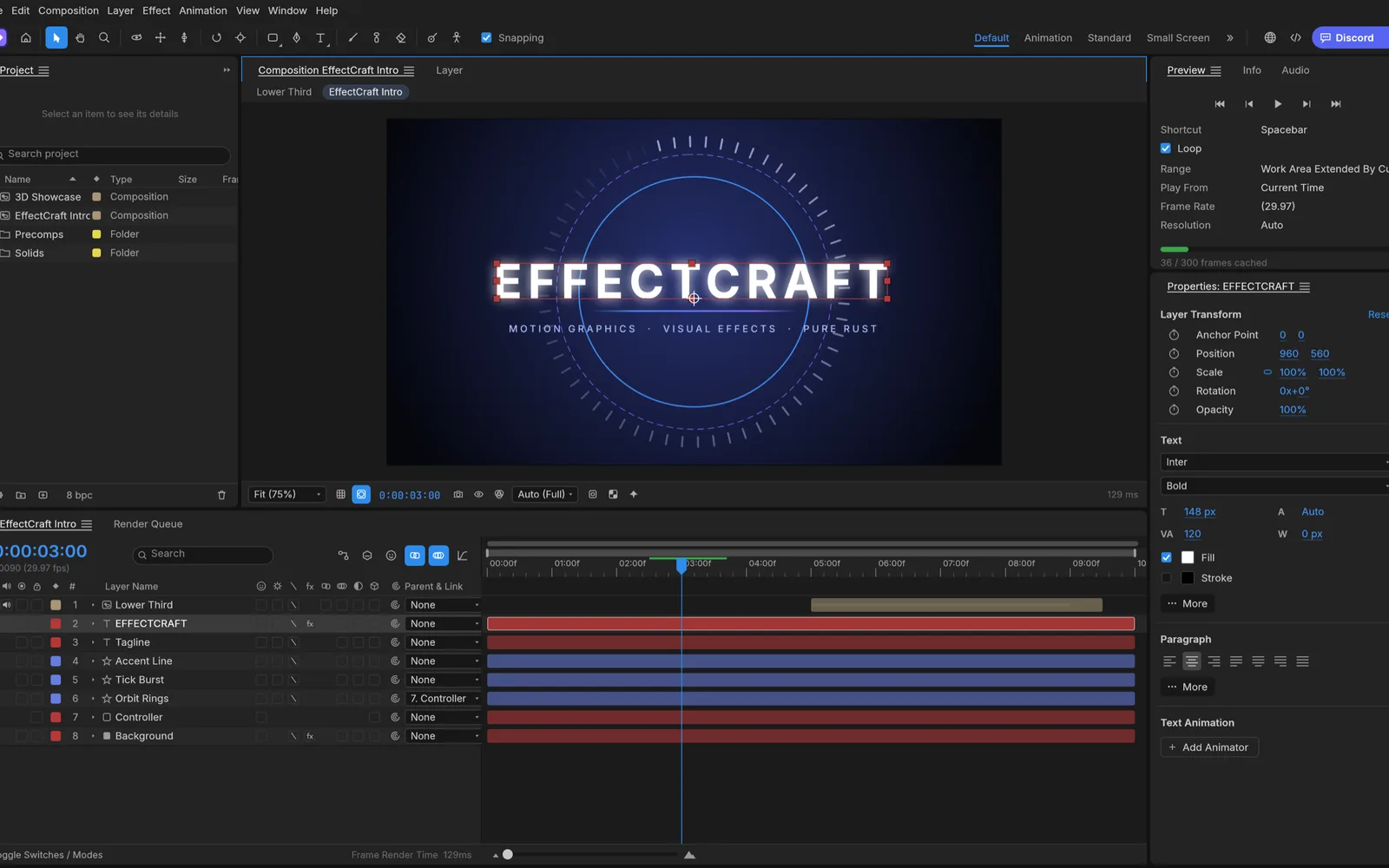
What carries over from After Effects?
| Area | In EffectCraft |
|---|---|
| Panels and menus | Project, Composition, Timeline, Effect Controls, Effects & Presets, Character, Paragraph, Align, Info, Preview, Audio and the Render Queue, with After Effects’ menu layout |
| Layers | Solids, shapes, text, footage, nested comps, nulls, adjustment layers, cameras and lights; parenting, track mattes, 38 blend modes, motion blur |
| Keyframes | Linear, Bezier, hold, auto and continuous Bezier, roving keys, Easy Ease (F9), Keyframe Velocity and a Graph Editor |
| Effects | 306, covering all 298 After Effects effect names, with their parameters and defaults; the nine layer styles |
| Expressions | JavaScript with the After Effects object model, the pick-whip and an inline editor |
| Shapes and masks | Trim paths, repeaters, round corners, merge paths, gradient strokes; pen-drawn masks with feather and expansion |
| Text | Point and paragraph text with text animators and range selectors |
| 3D | 3D layers, one- and two-node cameras with depth of field, four light types with soft shadows |
| Tracking and roto | Track Motion, Warp Stabilizer, mask and face tracking, 3D Camera Tracker, Roto Brush, Content-Aware Fill |
| Shortcuts | The property shortcuts (A, P, S, R, T, M, F, E, L, U and their double presses), Shift to add properties, Alt+Shift to key them |
What can you export?
The Render Queue has Render Settings and Output Modules like After Effects. It writes H.264 MP4, ProRes MOV (Proxy to 4444 XQ with alpha), HEVC and AV1 MP4, WebM with VP9 alpha or AV1, PNG, JPEG, TIFF and 32-bit EXR sequences, animated GIF and WAV or AIFF. Every encoder is written in Rust, so the browser build has the same list. In the browser, a finished render downloads; an image sequence arrives as one .zip.
One thing After Effects needs a plug-in for: File › Export › Lottie JSON… writes a composition as .json or .lottie for websites and apps, and lists anything Lottie can’t express. File › Import › Lottie… opens one as a new composition.
What doesn’t carry over yet?
- After Effects files. No .aep or .aepx projects, .ffx presets or .mogrt templates. EffectCraft saves readable JSON
.ecprojprojects and its own.ectemplatetemplates. - Plug-ins. Third-party After Effects plug-ins don’t run.
- Adobe services. Team Projects, Libraries, Media Encoder and the rest are not there.
- Exact behavior. EffectCraft is in alpha. Its developers estimate that about 91% of After Effects’ features exist and that it is about 45% of the way to replacing After Effects for professional work. Renders are not yet compared with After Effects automatically.
In the browser, also expect:
- Three fonts. Text layers can use the bundled Inter, Noto Serif and JetBrains Mono; a web page can’t read your installed fonts.
- A memory ceiling. At most 4 GiB, shared by the caches and the video decoders.
- GPU effects depend on the browser. Chrome and Edge render effects on the GPU in background workers; browsers without WebGPU in workers render them on the CPU.
If those matter, the desktop app is the same program without the browser limits.
How do you get started?
- Open the editor at effectcraft.run/editor. The first visit downloads the app and opens a demo project; look at its comps to see how things are built.
- Start a project. File › New › New Project, then Composition › New Composition… with your size, frame rate and duration.
- Bring in footage. File › Import › File…, or drop files onto the page. They are kept in your browser’s storage with the project.
- Build and animate the way you would in After Effects: layers in the Timeline, keyframes on their properties, effects from Effects & Presets.
- Save and render. File › Save stores the project in the browser and downloads an .ecproj copy. Composition › Add to Render Queue, then Render, downloads the video.
Click into the app before using shortcuts: keyboard input goes to the editor once it has focus. Some browser shortcuts, such as ⌘M on a Mac, are taken by the browser first, so use the menus for those.
FAQ
Is EffectCraft really free?
Yes. It is open source under MIT OR Apache-2.0, with no account, no subscription and no watermark. The license covers the software; it puts no conditions on the videos you render with it.
Can I open my .aep files?
No. EffectCraft cannot read After Effects projects (.aep or .aepx), animation presets (.ffx) or Motion Graphics templates (.mogrt), and After Effects plug-ins don’t run. Rebuild the comp; the layer types, keyframe behavior and effect names are the same, so it usually goes quickly for short pieces.
Do my expressions work?
Often, yes. Expressions are JavaScript with the After Effects object model, including wiggle, loopOut, thisComp.layer("…") and vector maths on arrays, with an inline editor and the pick-whip. Check anything complex, since behavior can still differ.
Is the online version slower than the desktop app?
Usually. The browser build runs one engine per worker without shared-memory threads and can use at most 4 GiB of memory. Short, HD motion graphics work well; long 4K footage is better in the desktop app, which is the same program.
Want to add effects to a clip right away? Follow how to add effects to a video online. Need artwork for a title? The AI tools generate backgrounds and elements on your own key.